Most teams I talk to don’t use just one AI coding tool anymore. One team member likes Claude Code, some prefer Cursor, and some have switched to Codex. People work with the tools they’re comfortable with, and that’s completely fine.
When all those agents need the same information, like how to deploy a product, that’s when trouble starts. Let me walk you through a simple example of how this goes wrong, and how a tool called OpenLore helps.
1. Same Project, Different Deployment Guidance
Imagine a small team of three developers. Priya uses Claude Code, Marcus uses Cursor, and Lena uses Codex. All three tools now read their instructions from the same file, AGENTS.md, so the tool is not the problem here. The team has three repositories: the main app, the infrastructure code, and the EU customer’s setup. Each repository has its own AGENTS.md file. Priya mostly works in the app repo, Marcus in the infrastructure repo, and Lena in the EU repo.
The team has three versions of their product, let’s call them “installations”:
- Production: the main system used by most customers.
- EU: a separate version for one big customer whose data must stay in Europe.
- Staging: a test environment where the team tests changes before releasing them.
Each installation has its different deployment process, different servers, different tools, and different review steps.
The team created one deployment guide and pasted it into the AGENTS.md file of each repository to help their AI agents handle deployments. So they had three copies of the same guide. Everything worked for a few weeks.
Then some things changed. The team moved the EU installation to a new server address. And the release engineering team introduced a new rule: every EU release now first needs their approval.
Priya updated the app repo’s AGENTS.md with both changes. Marcus missed the message, so the infrastructure repo still has the old EU server address. And Lena added a note to the EU repo’s file: “Skip the migration check.” after facing a problem in staging. She wanted to skip migration only for staging, but the note doesn’t mention that.
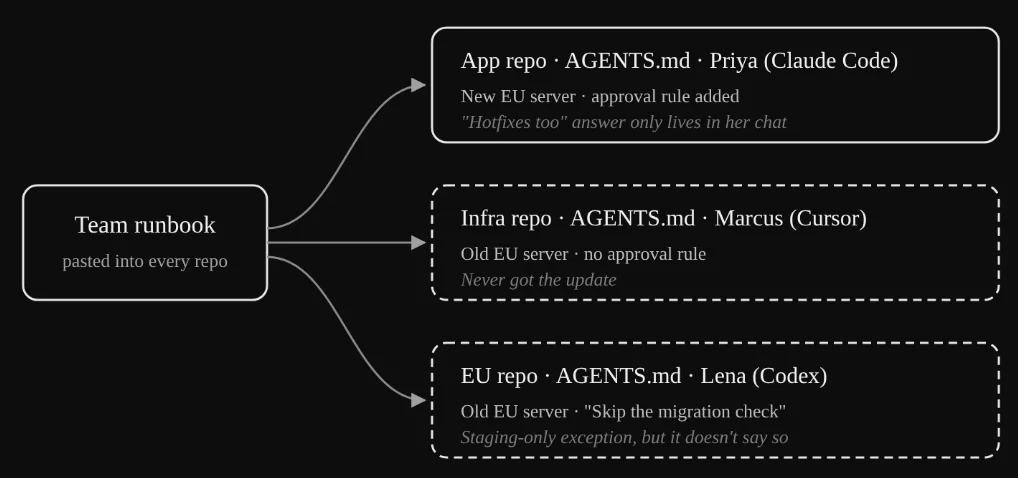
One runbook, three copies. A few weeks later, three different versions of the truth.
Now, all three agents are giving different ways to deploy the same product. Nobody made a mistake. Each team member made a sensible change based on the information they had.
And that’s the problem: information that starts out identical slowly drifts apart.
2. How the Copies Drifted Apart
Now, let’s look more closely at how this happened.
First, the update reached one copy but not the others. Priya has the new server address, Marcus has the old one, and there is no way to verify which one is correct.
Second, an important decision stayed in a chat. When the team introduced the approval rule, Priya asked: “Does this include urgent hotfixes?” The answer was yes. She told her AI agent, but she never updated the guide. The next conversation starts without that context, and Marcus and Lena never heard about the new rule.
Third, a one-time exception became a general rule. Lena’s “skip the migration check” note was for one staging problem. But without that context, it looks like a general rule for every deployment, including production.
And finally, nobody was responsible for keeping the copies in sync. The team had no process for updating every copy, and no one could mark all old copies as outdated.
You might wonder why the agents can’t just find this information from the code. The problem is that this kind of knowledge usually isn’t in the code. Details like which server the EU customer uses, who must approve a release, and when upgrades are allowed all live in old chats, old wiki pages, and people’s heads. An agent only remembers what it can access.
It helps to separate two types of information. Repo-specific instructions tell an AI agent how to work in that repo, like how to write commit messages or run tests. These instructions can be different for each repository. Shared team knowledge covers things like server addresses and who approves releases. This knowledge should be the same for every team member and every tool, so for this they need one source. The problem starts when developers unknowingly copy these shared facts into every repository’s AGENTS.md file.
3. Why This Actually Matters
You might think, “So someone has to update three files. Big deal.” But the real problems show up during deployment.
Marcus’s agent uses an old EU deployment server address that no one uses now, and misses approval from the release engineering team completely. Lena’s agent plans a production deployment without an important safety check. And nobody’s agent knows when the customer allows upgrades.
Then the team has to fix the agents’ mistakes. Reviewers double-check every line and don’t trust AI-generated plans anymore. Developers keep explaining the same things to their agents again and again. The time the agents were supposed to save disappears.
The real problem is not updating the files. It’s not knowing whether an agent is working with the right information.
4. A Different Approach: One Shared Source with OpenLore
OpenLore keeps team documentation in one place instead of everyone maintaining their own copy. Every AI agent reads from one source.
You store your docs as normal Markdown files in a folder, and OpenLore makes that folder available to your AI agents. Claude Code, Cursor, and Codex connect through MCP, a standard way for AI tools to connect to external services. Agents can also connect through SSH.
Once connected, agents can use commands like cat to read a file and grep to search the docs. They don’t get access to your actual computer; they get access to your docs through a restricted view. And when you update a file, every agent gets the new version when they read that file again.
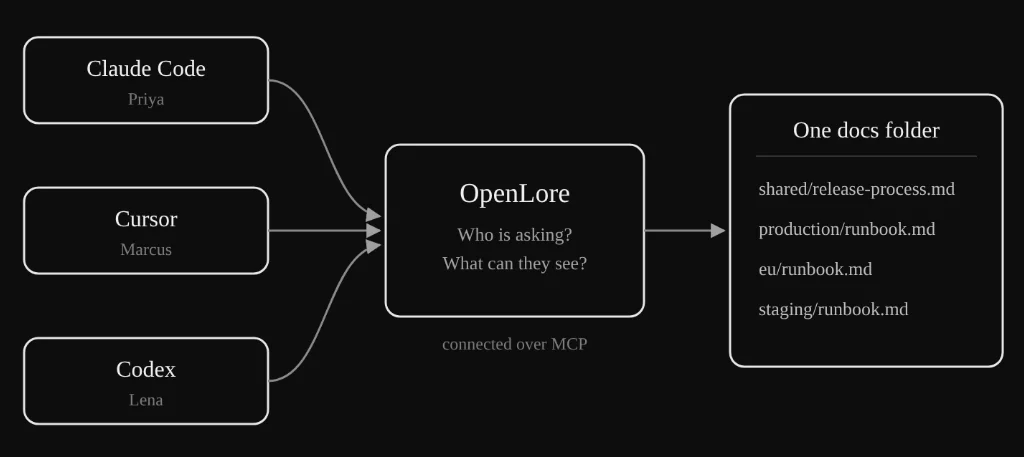
Three tools, one source. Update a file once and every agent gets it on its next read.
Here’s the before and after:
| Separate copies | One shared source with OpenLore |
|---|---|
| The guide is copied into each repository’s AGENTS.md. | Every agent reads the same guide from one place. |
| Every copy needs every update. | You update the guide once. |
| Exceptions lose their context. | Each exception sits right next to the installation it applies to. |
| Shared facts get mixed with repo-specific instructions. | Shared facts and repo-specific instructions are kept apart. |
Let me be honest about what OpenLore doesn’t do, too. It won’t write or update your guide for you. If nobody adds the new server address, it will keep showing the old one. It won’t update a chat that’s already running. And it can’t force an agent to read the docs. The team still needs to keep the guide accurate and tell agents to use it. OpenLore gives everyone one reliable place to find the latest information.
5. Let’s Set It Up: One Guide, Three Tools
Here’s how we would fix things, step by step. The team and server names are fictional, but the OpenLore commands and settings come from its official documentation.
The screenshots in this section are from a local demo I ran on my own laptop, so they show localhost instead of lore.example.com.
Step 1: Compare the copies
Put the three versions side by side. You’ll see right away where they disagree.
| App repo (Priya) | Infra repo (Marcus) | EU repo (Lena) | |
|---|---|---|---|
| EU server | New | Old | Old |
| Release approval | Yes (hotfix rule only in chat) | Missing | Missing |
| Migration check | Required | Required | “Skip it” (no scope) |
Doing this alone is eye-opening for most teams.
Step 2: Write one proper guide
Create a docs folder with one file per installation, plus one file for the shared release process:
docs/
└── deploy/
    ├── shared/release-process.md
    ├── production/runbook.md
    ├── eu/runbook.md
    └── staging/runbook.md
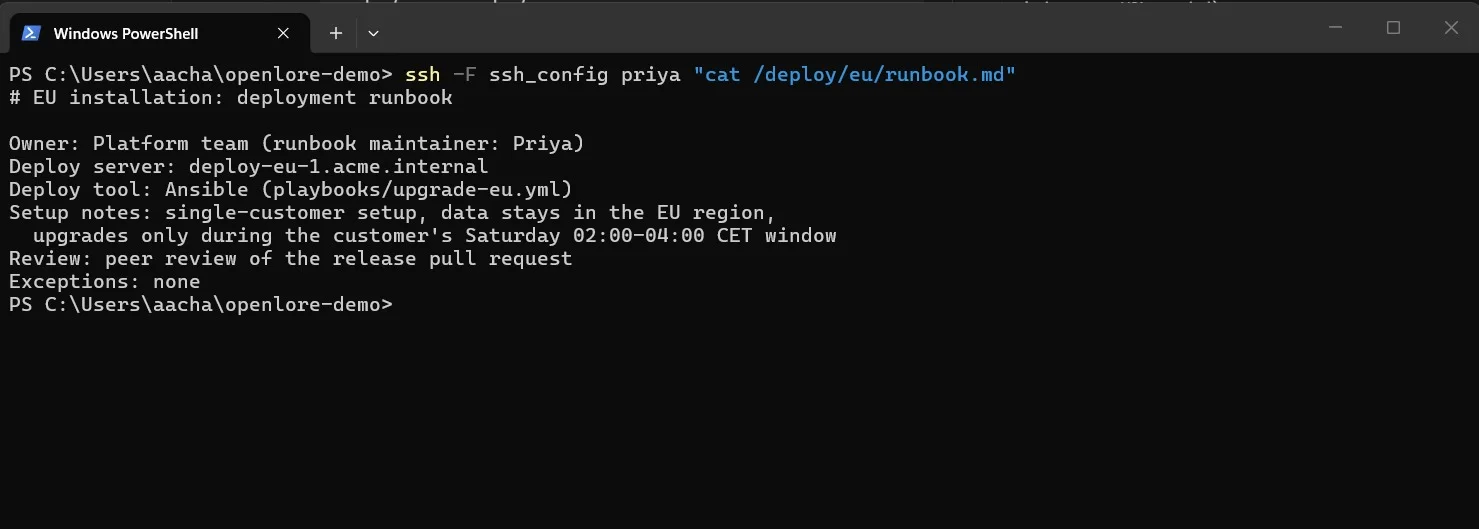
Each file covers who owns the installation, its server address, how its setup is different, which tool deploys it, and who reviews releases. Here’s what the EU file looks like before any updates:
docs/deploy/eu/runbook.md
# EU installation: deployment runbook

Owner: Platform team (runbook maintainer: Priya)
Deploy server: deploy-eu-1.acme.internal
Deploy tool: Ansible (playbooks/upgrade-eu.yml)
Setup notes: single-customer setup, data stays in the EU region,
  upgrades only during the customer's Saturday 02:00-04:00 CET window
Review: peer review of the release pull request
Exceptions: none
Lena’s exception goes into the staging file, with a clear note that it applies only to staging.
Step 3: Start OpenLore
Serving the folder takes one command:
openlore ./docs
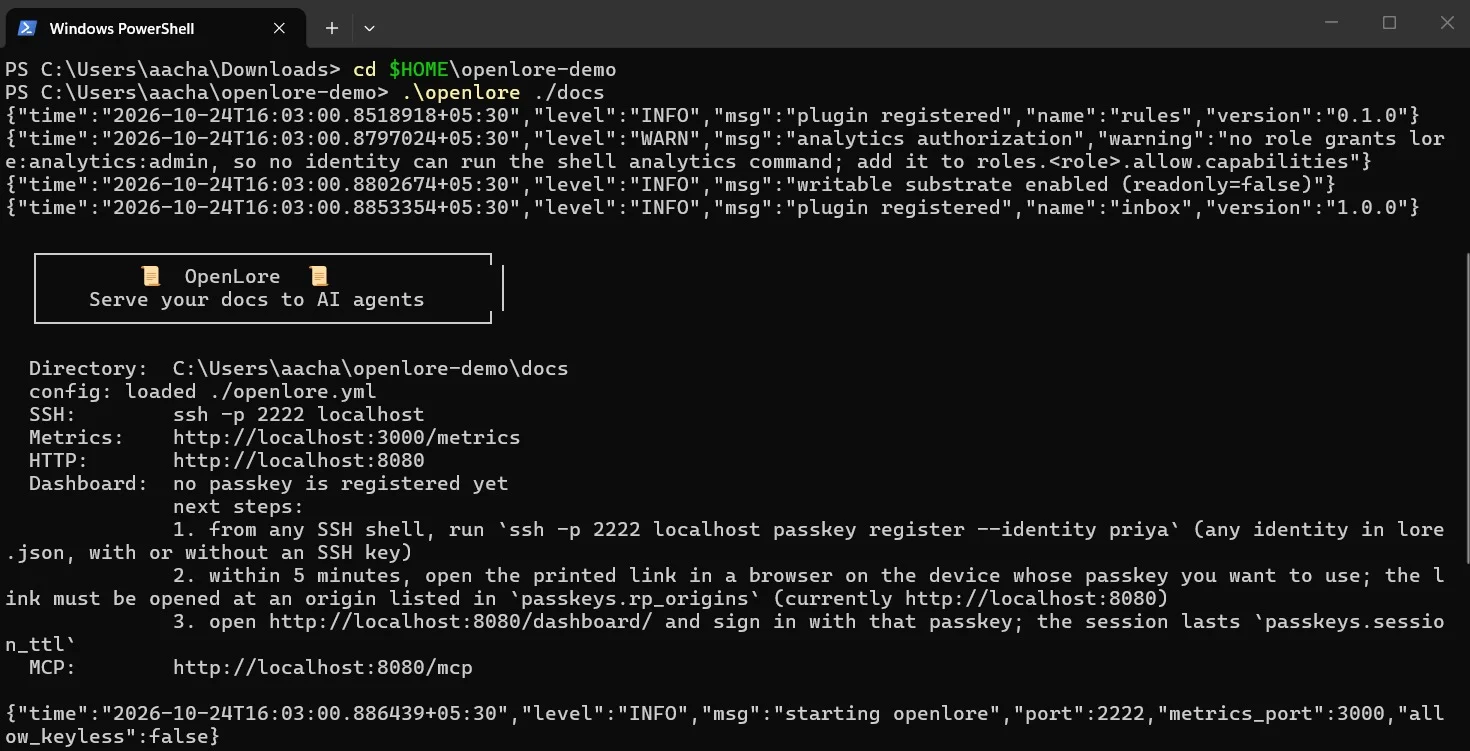
By default, SSH runs on port 2222, and MCP and the web view share port 8080. Everything inside ./docs shows up at /, so the EU file is /deploy/eu/runbook.md to an agent. For a real team, you’d run this on a shared server everyone can reach. I’ll use lore.example.com from here on.
Step 4: Connect all three tools
Each developer adds the same server to their own tool. Priya runs this in her terminal for Claude Code:
claude mcp add --transport http openlore https://lore.example.com/mcp
Lena does the same for Codex:
codex mcp add openlore --url https://lore.example.com/mcp
And Marcus creates a .cursor/mcp.json file in the project, then reloads Cursor:
.cursor/mcp.json
{
  "mcpServers": {
    "openlore": {
      "url": "https://lore.example.com/mcp"
    }
  }
}
Now three different tools point to one source.
Step 5: Make everyone sign in
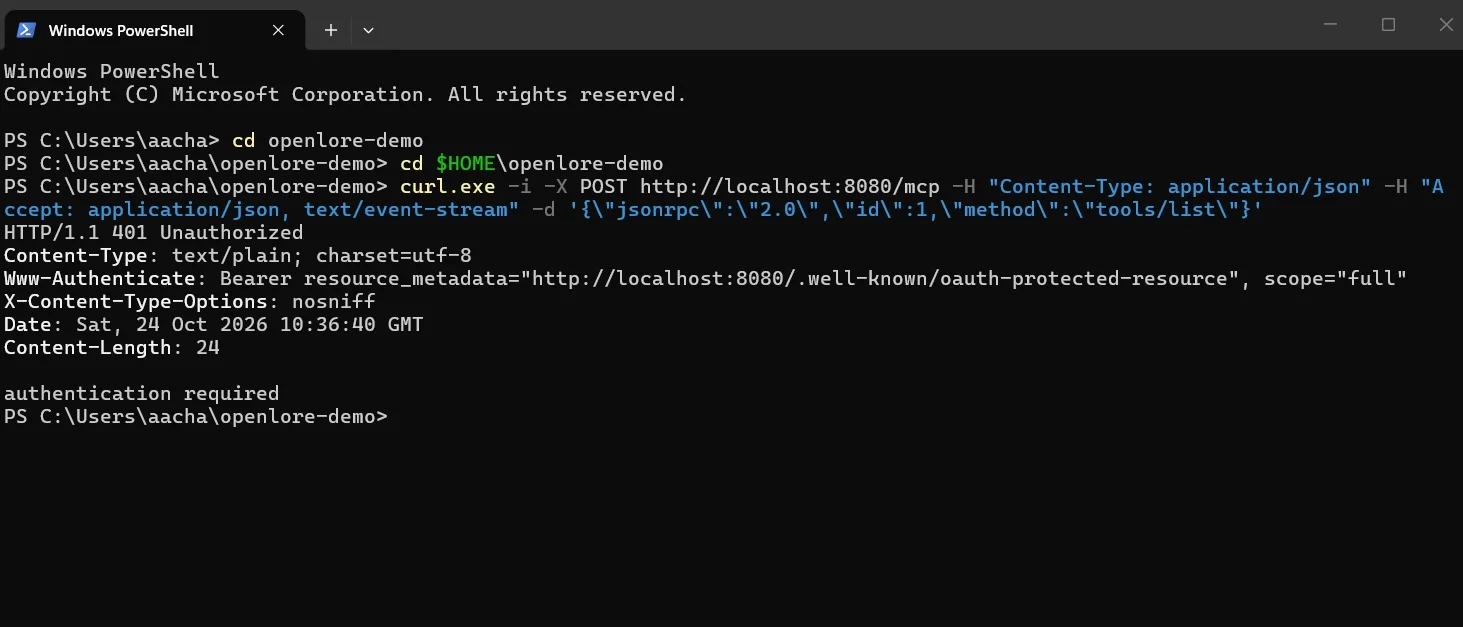
Out of the box, OpenLore is read-only and anyone who connects can see everything. Our team needs two things: people should sign in so OpenLore knows who’s asking, and Priya should be able to edit the guide. Both live in OpenLore’s main settings file:
openlore.yml
readonly: false
auth_file: ./lore.json
mcp:
  require_auth: true
tokens:
  issuer: https://lore.example.com
  audience: https://lore.example.com
readonly: false allows edits, but only for people who’ve been given edit access. require_auth: true means every AI tool has to sign in before it can read anything. The access rules themselves go in lore.json, which I’ll cover in the next section.
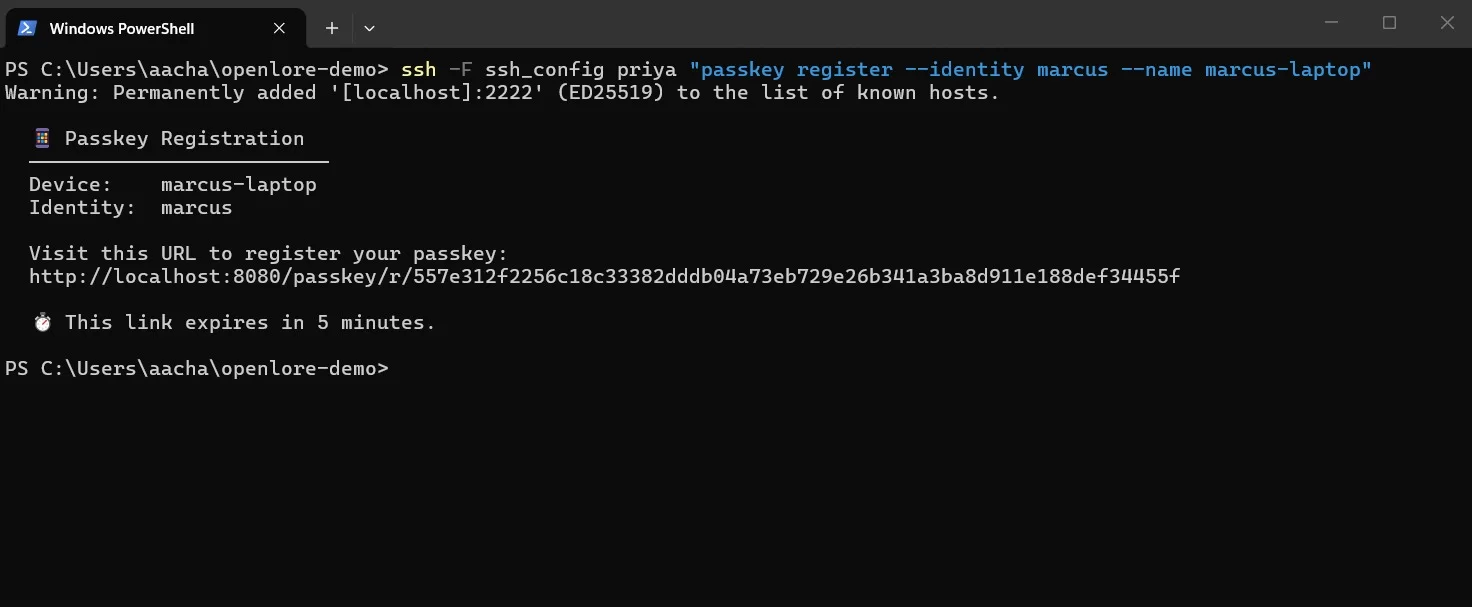
Signing in uses passkeys, so each person needs one first. Whoever administers the server runs OpenLore’s passkey register command once per person, inside an OpenLore session:
passkey register --identity marcus --name marcus-laptop
It prints a short-lived link. Marcus opens it in his browser and creates his passkey. After that, whenever Cursor connects to OpenLore, it opens a browser window and he signs in with that passkey. Claude Code and Codex work the same way.
Step 6: Tell the agents to check the guide first
Every OpenLore server can print a ready-made instruction snippet that tells an agent when and how to search the docs. Priya has SSH access, so she generates it and adds it to the AGENTS.md file in each repository:
ssh -p 2222 lore.example.com agents >> AGENTS.md
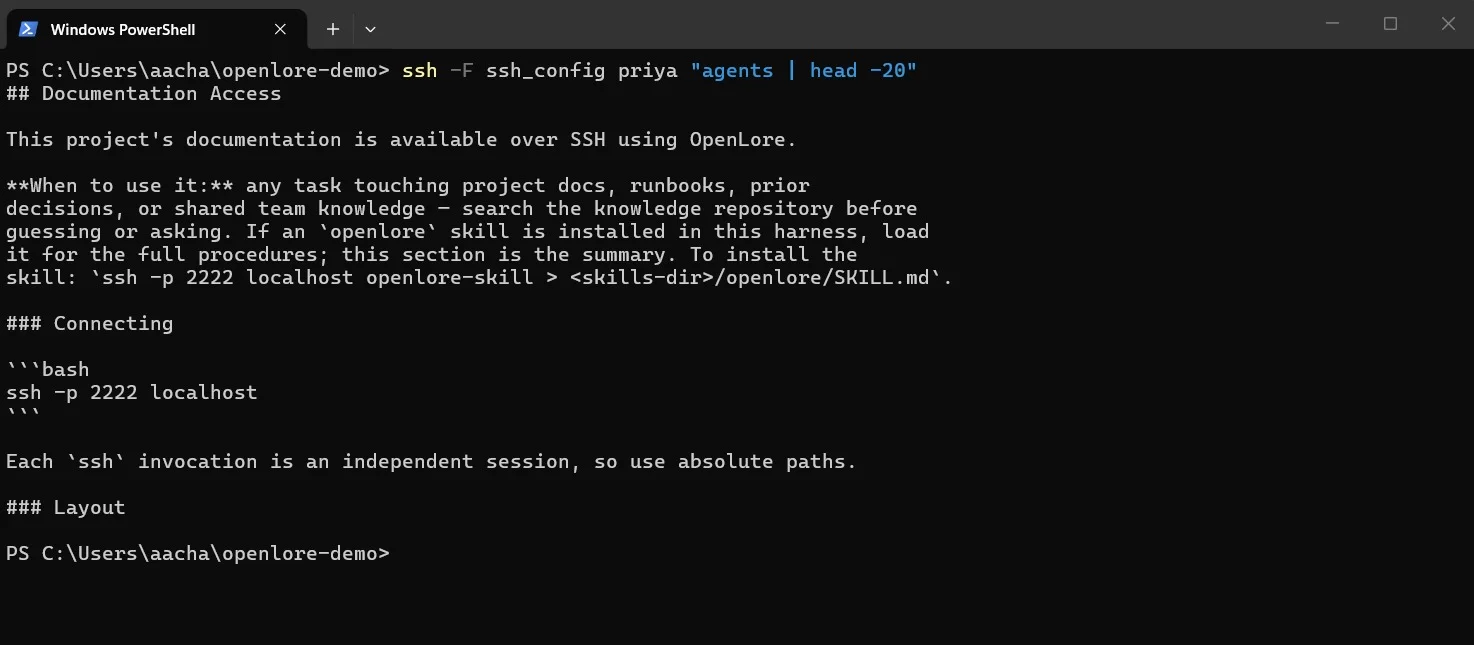
Claude Code, Cursor, and Codex all read AGENTS.md, so one file per repository works for all three tools. Claude Code reads it as long as there is no CLAUDE.md in the same folder. Then she adds one plain line of her own to each:
Before suggesting any deployment steps, read the runbook for that installation from OpenLore.
Finally, the team deletes the old pasted guide from every repository’s AGENTS.md. Now each AGENTS.md only has repo-specific instructions plus a pointer to the shared guide.
Step 7: Check where the answer came from
Ask each agent: “What are the steps for the next EU deployment?” Then look at what it actually did. You should see it running something like cat /deploy/eu/runbook.md through OpenLore. All three plans should now match, because all three read the same file, even though it still has the old server address.
Step 8: Make the update
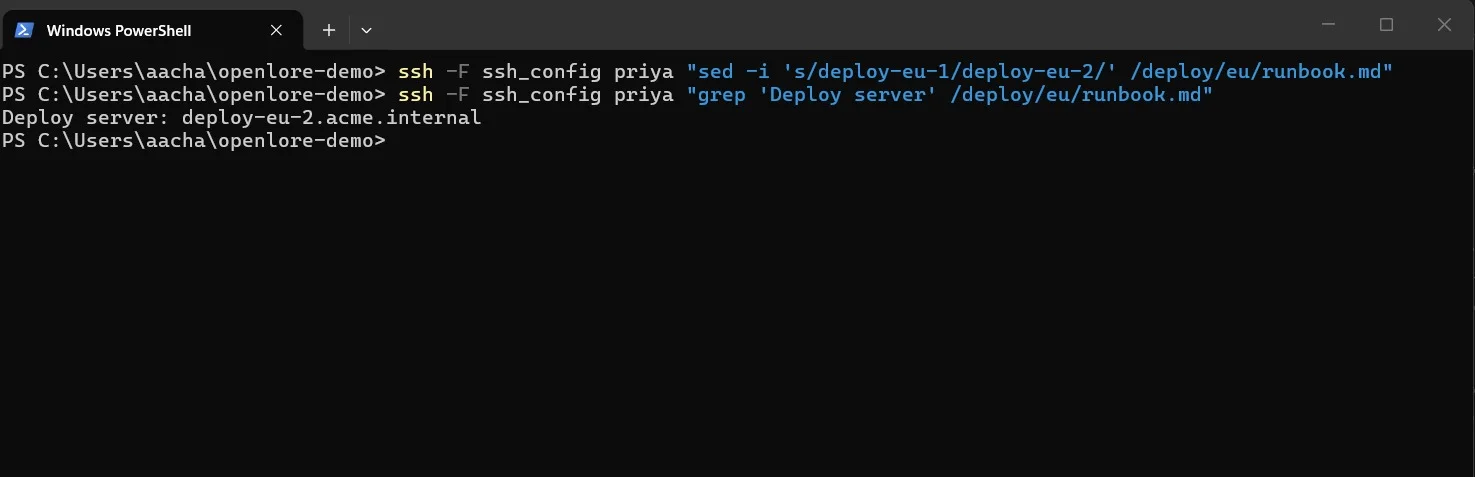
Priya maintains the guide, so she changes the server address:
ssh -p 2222 lore.example.com \
  "sed -i 's/deploy-eu-1/deploy-eu-2/' /deploy/eu/runbook.md"
Then she asks her Claude Code session to update the review line, so it says release engineering must approve every EU release, hotfixes included, before the maintenance window. That hotfix answer that was stuck in her chat finally lands in the guide.
There are two nice safety features here. If someone else changed the file after she last read it, OpenLore rejects her edit instead of silently overwriting their work. And because her agent made the second edit while signed in as her, OpenLore records both her name and the tool’s name.
Step 9: Ask again
Open a fresh chat in each tool and ask the same question. Every agent should now use deploy-eu-2 and include the approval step. If one still shows the old address, check whether it actually re-read the file or just reused something from earlier in the chat.
One thing to keep clear: in this setup, OpenLore only provides the guide. Actually running the deployment, holding server passwords, and approving the release all stay with your existing tools and people.
6. Sharing Docs Without Sharing Everything
Sharing information doesn’t mean everyone can access everything. For example, the team hires Ravi, who will only work on the EU customer. He needs to access the EU guide, but not the internal production docs.
OpenLore manages access with three simple ideas:
- Identity: who is accessing the information, for example, “Ravi.”
- Role: what kind of access that person gets, for example, “contractor.”
- Docset: a group of documents with its own access rules, for example “the EU docs.”
So the team might configure access like this:
| Docs | Developers | Contractor (Ravi) | Maintainer (Priya) |
|---|---|---|---|
| Shared release process | Read | Read | Read and edit |
| EU guide | Read | Read | Read and edit |
| Production guide | Read | No access | Read and edit |
| Staging guide | Read | No access | Read and edit |
In OpenLore, these rules live in lore.json. Each folder has its own docset, because different folders need different rules:
lore.json
{
  "allow_keyless": false,
  "unknown_identity": "deny",
  "roles": {
    "developer": {},
    "contractor": {},
    "maintainer": {}
  },
  "docsets": {
    "shared": {
      "paths": ["/deploy/shared"],
      "access": {
        "allow": {
          "developer": "ro",
          "contractor": "ro",
          "maintainer": "rw"
        }
      }
    },
    "eu": {
      "paths": ["/deploy/eu"],
      "access": {
        "allow": {
          "developer": "ro",
          "contractor": "ro",
          "maintainer": "rw"
        }
      }
    },
    "production": {
      "paths": ["/deploy/production"],
      "access": {
        "allow": {
          "developer": "ro",
          "maintainer": "rw"
        }
      }
    },
    "staging": {
      "paths": ["/deploy/staging"],
      "access": {
        "allow": {
          "developer": "ro",
          "maintainer": "rw"
        }
      }
    }
  },
  "identities": [
    {
      "name": "priya",
      "public_key": "ssh-ed25519 AAAA...",
      "roles": ["developer", "maintainer"]
    },
    { "name": "marcus", "roles": ["developer"] },
    { "name": "lena", "roles": ["developer"] },
    { "name": "ravi", "roles": ["contractor"] }
  ]
}
Here ro means read-only and rw means read and write. The contractor role isn’t present under production or staging, so Ravi cannot access that information. Priya’s SSH key is listed, so OpenLore recognises her SSH commands from Steps 6 and 8, while the others sign in with passkeys. Setting allow_keyless to false and unknown_identity to deny blocks anonymous SSH connections, and require_auth from Step 5 does the same for the AI tools, so nobody can access anything without signing in.
In the demo, we tried both scenarios. Ravi asks about the EU deployment, and his agent reads the guide without any issues. Then he asks about production, and his agent can’t find those documents. Those docs don’t just say “access denied.” They’re completely invisible to him: not listed, not searchable, and not reachable. If he runs lore docsets, he’ll only see the docs he has permission to access.
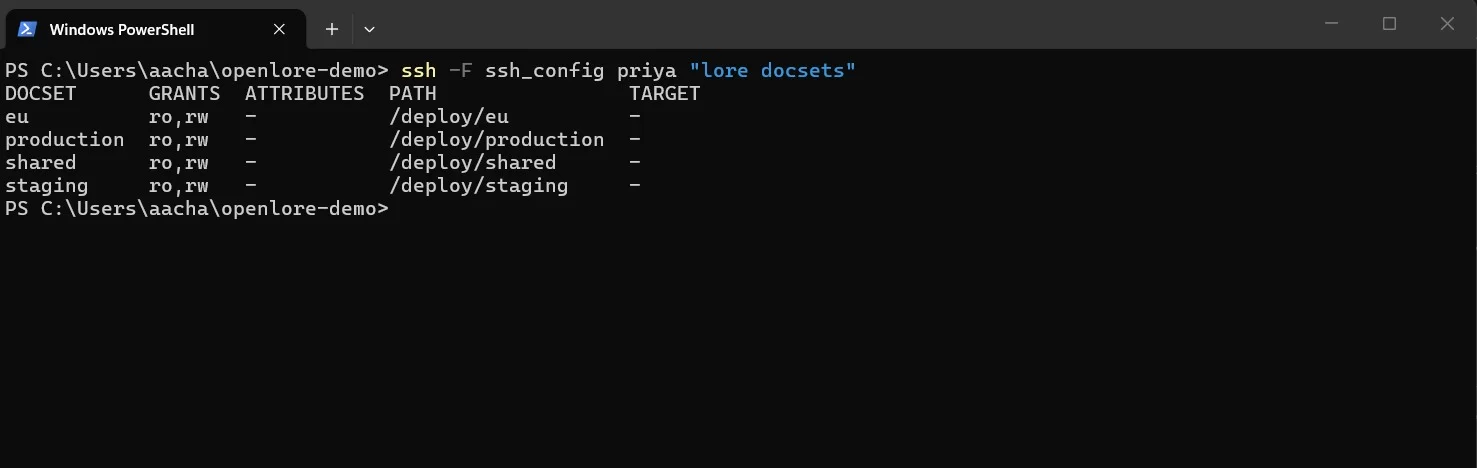
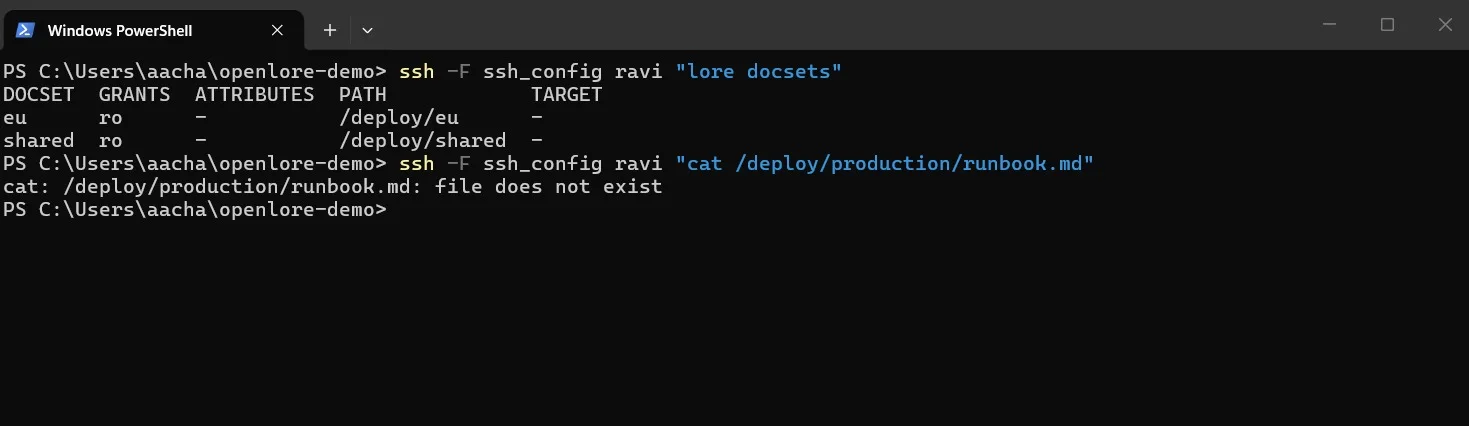
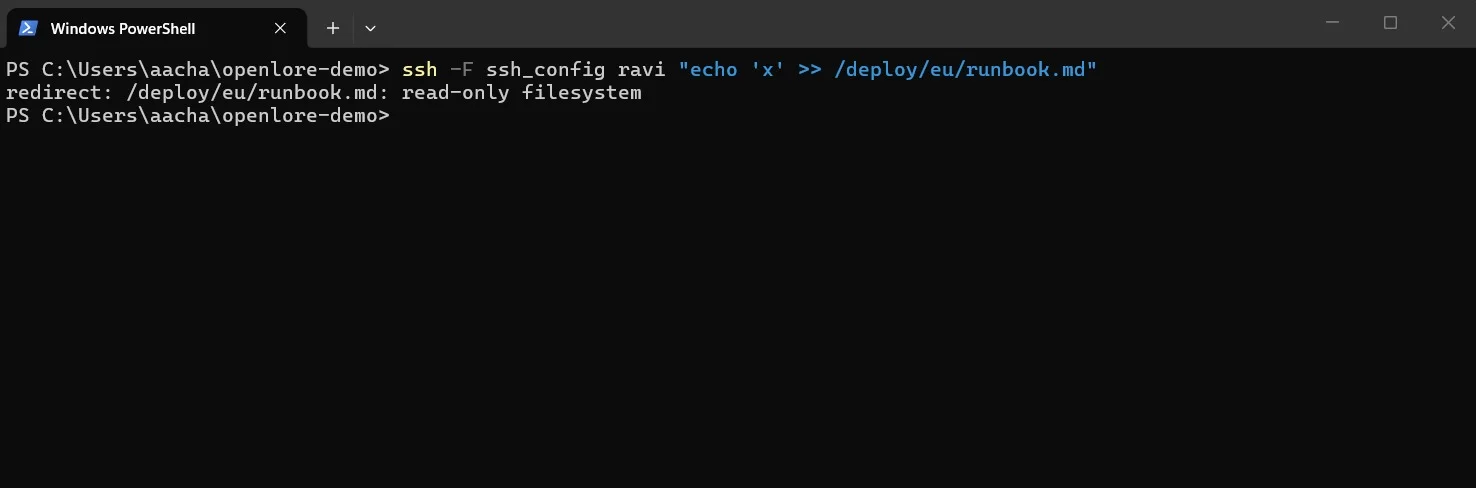
Notice the key difference: who Ravi is, not which tool he uses. Marcus also uses Cursor, but he can access the production guide. Access depends on the person, not on the app.
One more thing: these permissions only control who can read or edit the documents. Reading the EU guide doesn’t mean Ravi has access to the EU servers, and being able to edit documents doesn’t let Priya approve a release.
7. Keeping Things from Drifting Again
A shared guide works only if the team actually uses it. Here are a few simple habits that make that happen:
- Assign an owner. Choose someone who will keep the guide updated. Otherwise, it will become outdated.
- Keep each installation separate. Maintain a separate guide for each installation; document every exception, every specific rule that applies to it.
- Remove the old copies. If any repo’s
AGENTS.mdstill has the outdated instructions in it, agents will keep using it. - Keep repo instructions in the repo. Each
AGENTS.mdcan keep instructions specific to that repo, like how to run tests. Shared information must stay in common guide. - Tell agents to check the guide. Add an instruction for each agent to read the shared guide before starting any work.
- Start a fresh chat after changes. A chat that started before an update will still remember the old information, so start a new chat or ask the agent to re-read the guide.
This problem isn’t limited to teams. Even if you’re one developer managing multiple setups for different clients, you’ll run into the same issue, and the same fix works.
Keeping one guide updated is a lot easier than maintaining three separate copies.
8. Wrapping Up
Let’s go back to Priya, Marcus, and Lena. They all started with the same guide. Then a server changed, a review process changed, and a one-time exception lost its context. Each developer made small, sensible edits to their own repo’s AGENTS.md and soon the three AI agents were working with three different versions of the same guide.
With OpenLore, all three tools read from one guide the team maintains, and each person sees only what they’re allowed to see. When Priya updated the server address, every agent got the latest version the next time they read the guide.
OpenLore doesn’t eliminate the need to keep information updated. Someone still needs to maintain the guide’s accuracy, and agents still need to check instructions. But if everything is present in one place, the team needs to update only one guide instead of three.
Want to try it? Start small, with one installation. Write the deployment guide for it. Connect two of your AI tools, update one detail, and check if both tools see the update. If that works, you can roll it out to the rest of your team.